Google just dropped something Go developers have been waiting for — the Agent Development Kit (ADK) for Go. It’s an open-source, code-first toolkit to build AI agents. No Python. No Node. Just Go.
If you’ve been watching the AI agent space, you know one painful truth — almost everything is Python-first. LangChain, LlamaIndex, CrewAI — all Python. Go developers had to either switch languages or hand-roll their own SDK wrappers. ADK for Go finally fixes that.
Let me walk you through what it is, how it works, and show you a working example.
What Is ADK for Go?
ADK is Google’s framework for building, evaluating, and deploying AI agents. Until now, if you wanted a proper Golang LLM framework, your options were to roll your own wrappers or switch to Python. ADK Go changes that — it’s a first-class Go SDK with the same concepts as the Python version, but it feels natural in Go.
Think of it like this — if you’ve used Gin for HTTP servers, ADK is that, but for AI agents. Small API surface. Idiomatic Go. Gets out of your way.
Here’s what you get out of the box:
- LLM agents — wire up Gemini, Claude, or Ollama with a few lines
- Tools — give your agent the ability to call functions, search the web, or hit your own APIs
- Workflow agents — sequential, parallel, and loop agents for multi-step tasks
- Session and memory management — built-in services for state
- Runners and launchers — run agents from CLI, a web UI, or your own server
- A2A protocol — agent-to-agent communication for multi-agent systems
And because this is Go, everything is strongly typed. No more guessing what a dict is supposed to look like.
Why Build AI Agents in Golang?
Here’s the thing. Most AI tooling was built in Python because the researchers who trained the models worked in Python. But when you’re shipping agents to production — handling thousands of concurrent sessions, managing memory, deploying to Cloud Run — Go is a better fit.
Small binaries. No runtime dependencies. Built-in concurrency. Fast cold starts. All the stuff that makes Go great for backend services also makes it great for running agents.
ADK for Go means you can now build AI agents in Golang alongside the rest of your backend. No more Python sidecar services just to talk to an LLM.
Core Concepts
Before we write code, let’s understand the pieces:
| Concept | What It Does |
|---|---|
| Model | The LLM powering the agent (Gemini, Claude, Ollama, etc.) |
| Agent | The brain — takes user input, decides what to do |
| Tool | A function the agent can call (search, database, custom logic) |
| Runner | Runs the agent, manages sessions and events |
| Session | Holds conversation state and history |
An agent is basically a model + instructions + tools. You tell it who it is, what it should do, and what abilities it has. The model figures out the rest.
Prerequisites
Before we start, make sure you’ve got:
- Go 1.24.4 or later — ADK Go uses some newer language features. Check with
go version. - A Gemini API key — grab a free one from Google AI Studio.
- Basic Go familiarity — you should be comfortable with structs, interfaces, and
go mod.
That’s it. No Docker, no Python runtime, no extra tooling.
Building Your First AI Agent with ADK for Go
Let’s build a simple assistant. First, create a new Go module and install the packages:
go mod init my-agent
go get google.golang.org/adk
go get google.golang.org/genai
Then export your Gemini API key so the agent can talk to the model:
export GOOGLE_API_KEY="your-key-here"Now here’s a minimal agent that uses Gemini and the built-in Google Search tool:
package main

import (
	"context"
	"log"
	"os"

	"google.golang.org/genai"

	"google.golang.org/adk/agent/llmagent"
	"google.golang.org/adk/model/gemini"
	"google.golang.org/adk/tool"
	"google.golang.org/adk/tool/geminitool"
)

func main() {
	ctx := context.Background()

	model, err := gemini.NewModel(ctx, "gemini-2.5-flash", &genai.ClientConfig{
		APIKey: os.Getenv("GOOGLE_API_KEY"),
	})
	if err != nil {
		log.Fatalf("model init failed: %v", err)
	}

	weatherAgent, err := llmagent.New(llmagent.Config{
		Name:        "weather_agent",
		Description: "Answers weather questions using Google Search.",
		Model:       model,
		Instruction: "You answer weather questions. Use the search tool when needed.",
		Tools: []tool.Tool{
			geminitool.GoogleSearch{},
		},
	})
	if err != nil {
		log.Fatalf("agent init failed: %v", err)
	}

	log.Printf("Agent ready: %s", weatherAgent.Name())
}
Four things happen here. You create a Gemini model. You create an LLM agent with a name, description, and instructions. You pass in the Google Search tool. That’s it — your agent can now answer weather questions by searching the web.
But just creating an agent isn’t useful. You need to run it.
Running Your Go AI Agent Locally
ADK gives you two ways to run agents — the Launcher (for CLI/web UI) and the Runner (for production).
For quick testing, the Launcher is perfect. But there’s a catch — to get the web UI working you need to wire up a few services. Here’s the full setup:
package main

import (
	"context"
	"log"
	"os"

	"google.golang.org/genai"

	"google.golang.org/adk/agent"
	"google.golang.org/adk/agent/llmagent"
	"google.golang.org/adk/artifact"
	"google.golang.org/adk/cmd/launcher"
	"google.golang.org/adk/cmd/launcher/full"
	"google.golang.org/adk/memory"
	"google.golang.org/adk/model/gemini"
	"google.golang.org/adk/session"
)

func main() {
	ctx := context.Background()

	model, _ := gemini.NewModel(ctx, "gemini-2.5-flash", &genai.ClientConfig{
		APIKey: os.Getenv("GOOGLE_API_KEY"),
	})

	myAgent, _ := llmagent.New(llmagent.Config{
		Name:        "assistant",
		Model:       model,
		Description: "A helpful assistant",
		Instruction: "You are a helpful assistant.",
	})

	config := &launcher.Config{
		AgentLoader:     agent.NewSingleLoader(myAgent),
		SessionService:  session.InMemoryService(),
		ArtifactService: artifact.InMemoryService(),
		MemoryService:   memory.InMemoryService(),
	}

	l := full.NewLauncher()
	if err := l.Execute(ctx, config, os.Args[1:]); err != nil {
		log.Fatalf("run failed: %v", err)
	}
}
Three services matter here:
- SessionService — holds conversation history between turns
- ArtifactService — stores any files or data your tools produce
- MemoryService — stores long-term memory across sessions
ADK ships with InMemoryService() variants for all three — perfect for local dev. For production you’d swap these for Firestore, Cloud SQL, or your own implementation.
Now you can run your agent in different modes:
go run main.go console              # interactive terminal
go run main.go web api webui        # REST API + Web UI at localhost:8080
The web command takes sublaunchers — api starts the REST API server and webui starts the chat interface. Run both together and you get a full dev playground at http://localhost:8080 with chat, tool call inspection, and session state viewer. All without writing any frontend code.
Custom Tools and Gemini Function Calling in Go
The built-in tools are nice, but the real power is giving your agent access to your own functions. This is where Gemini function calling in Go actually shines — ADK handles all the schema plumbing for you. Let’s add a custom weather tool:
package main

import (
	"fmt"

	"google.golang.org/adk/tool"
	"google.golang.org/adk/tool/functiontool"
)

type WeatherInput struct {
	City    string `json:"city" jsonschema:"City name"`
	Country string `json:"country,omitempty" jsonschema:"Country code"`
}

type WeatherOutput struct {
	Temperature float64 `json:"temperature"`
	Condition   string  `json:"condition"`
}

func getWeather(ctx tool.Context, in WeatherInput) (WeatherOutput, error) {
	// Call your real weather API here
	return WeatherOutput{
		Temperature: 32.5,
		Condition:   fmt.Sprintf("Hot and humid in %s", in.City),
	}, nil
}

func newWeatherTool() (tool.Tool, error) {
	return functiontool.New(functiontool.Config{
		Name:        "get_weather",
		Description: "Gets current weather for a city",
	}, getWeather)
}
Look at what’s happening here. You define plain Go structs for input and output. You write a regular Go function. functiontool.New takes care of the rest — it reads your struct tags, builds a JSON schema, and registers the tool so the LLM knows how to call it.
No decorators. No magic. Just structs and functions. This is why Go feels so good for this — the type system does the heavy lifting.
To use the tool, pass it to your agent:
weatherTool, _ := newWeatherTool()

myAgent, _ := llmagent.New(llmagent.Config{
    Name:        "weather_agent",
    Model:       model,
    Description: "Weather assistant",
    Instruction: "Answer weather questions using the get_weather tool.",
    Tools:       []tool.Tool{weatherTool},
})
Now when a user asks “what’s the weather in Chennai?”, the agent will call your getWeather function with {city: "Chennai"} and use the result to answer.
One gotcha I hit — save this for later. Gemini doesn’t let you mix built-in tools like
GoogleSearch{}and custom function tools in the same agent. You’ll get this error:Built-in tools ({google_search}) and Function Calling cannot be combined in the same request. Please choose one to continue.Pick one or the other per agent. If you need both, split them across two agents and orchestrate with a workflow.
Seeing It Run
Time to fire it up. Make sure your GOOGLE_API_KEY is set, then start the web UI:
export GOOGLE_API_KEY="your-key-here"
go run main.go web api webui
Open http://localhost:8080 in your browser. You’ll land on a full chat playground for your agent. Ask it What's the weather in Chennai? and then follow up with Compare the weather in Chennai and Mumbai. Here’s what came back for me:
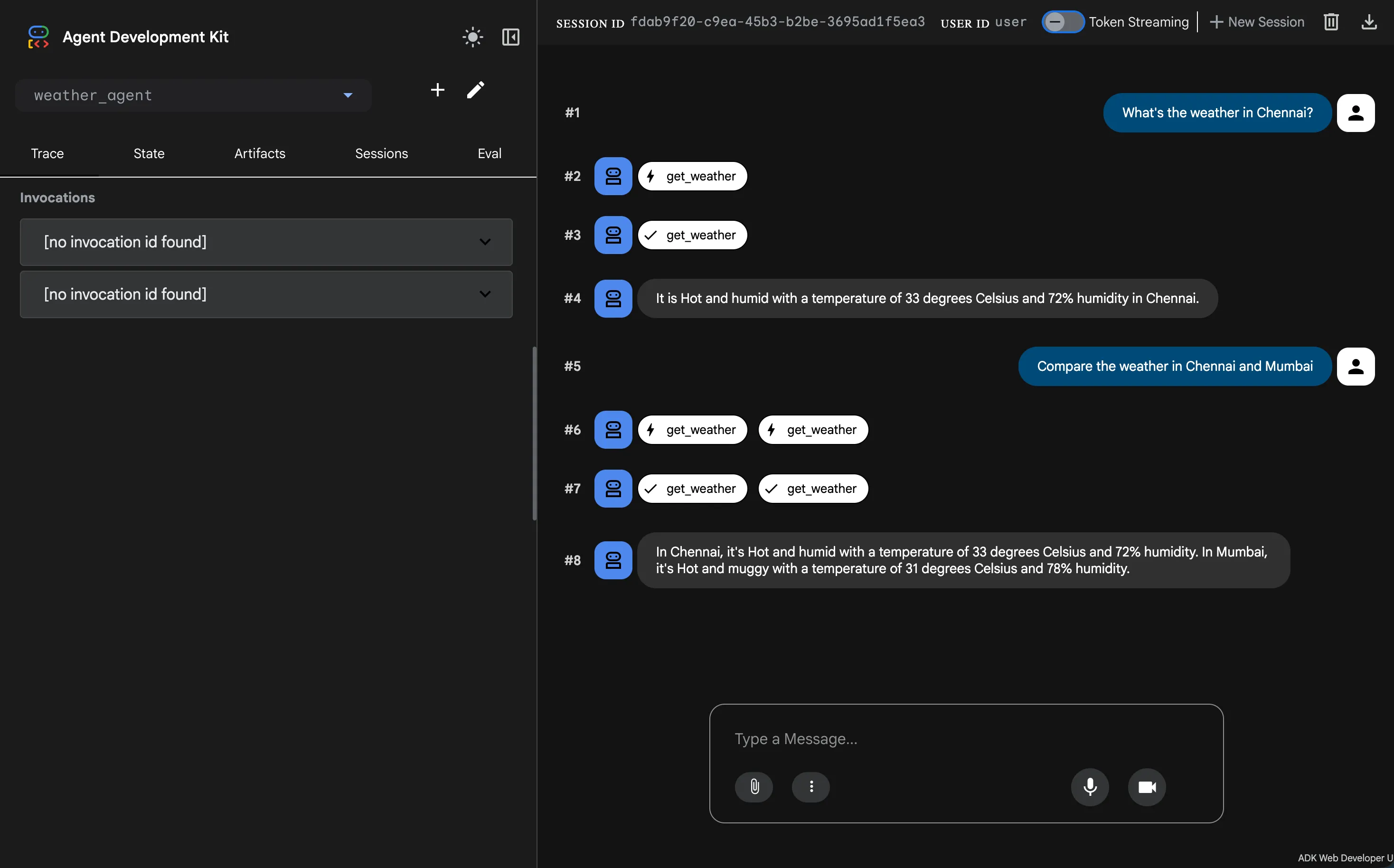
Notice a few things:
- Tool calls are first-class — each
get_weathercall shows up as a badge in the chat, with a loading state and a checkmark when it’s done - Parallel tool calls just work — when I asked to compare Chennai and Mumbai, ADK fired both
get_weathercalls at the same time. Zero extra code from me. - Session state is tracked — the Trace, State, Artifacts, Sessions, and Eval tabs on the left give you everything you need to debug what the agent is actually doing
If you’d rather stay in the terminal, use console mode instead — same agent, just no browser:
go run main.go consoleType your question at the User -> prompt and the agent replies inline:
![ADK Go agent console mode output. The user typed "Whats the weather in Chennai?" and the agent logged "[tool] get_weather called for city='Chennai' country='India'" before replying "The weather in Chennai is Hot and humid with a temperature of 33 degrees Celsius and 72% humidity."](/_astro/adk-go-agent-console-mode-output.SEw04mII_Z14tzkJ.webp)
That [tool] get_weather called for city="Chennai" country="India" line is from the log.Printf inside the Go function. The agent read the user’s message, figured out it needed the weather tool, extracted both the city and the country from the prompt, and called my function with the right arguments. No parsing, no intent classification, no regex — the LLM just does it.
Multi-Agent Workflows
Here’s where ADK gets interesting. For complex tasks, you don’t use one big agent — you chain small specialized agents together. It’s like a restaurant kitchen. One cook handles starters, another the main course, another desserts. Each does one thing well.
ADK gives you three workflow types:
- Sequential — run agents in order (step 1 → step 2 → step 3)
- Parallel — run agents at the same time (fan-out search across sources)
- Loop — keep running until a condition is met (iterative refinement)
Let’s do something real. Say you’re drowning in GitHub issues and want to auto-triage them. You need three agents working in order:
issue_reader— pulls the issue title and body from GitHubtriage_bot— an LLM agent that categorizes the issue (bug, feature, question) and drafts a replyslack_notifier— posts a summary to your team’s Slack channel
Each agent does one thing. Chain them with a sequentialagent and you’ve got a ticket triage workflow:
import (
	"google.golang.org/adk/agent"
	"google.golang.org/adk/agent/llmagent"
	"google.golang.org/adk/agent/workflowagents/sequentialagent"
	"google.golang.org/adk/tool"
)

// Agent 1: fetch the issue (custom Run func that hits GitHub API)
issueReader, _ := agent.New(agent.Config{
    Name:        "issue_reader",
    Description: "Reads an incoming GitHub issue",
    Run:         fetchIssueFromGitHub, // your custom run function
})

// Agent 2: LLM categorizes the issue and drafts a reply
triageBot, _ := llmagent.New(llmagent.Config{
    Name:        "triage_bot",
    Model:       model,
    Description: "Categorizes issues and drafts replies",
    Instruction: "Categorize the issue as bug, feature, or question. Then draft a short, friendly reply acknowledging the report.",
    Tools:       []tool.Tool{draftReplyTool},
})

// Agent 3: post the summary to Slack (custom Run func)
slackNotifier, _ := agent.New(agent.Config{
    Name:        "slack_notifier",
    Description: "Posts the triage summary to Slack",
    Run:         postToSlack, // your custom run function
})

// Chain them together
triage, err := sequentialagent.New(sequentialagent.Config{
    AgentConfig: agent.Config{
        Name:        "issue_triage",
        Description: "Read → categorize → notify",
        SubAgents:   []agent.Agent{issueReader, triageBot, slackNotifier},
    },
})
Each sub-agent runs in order. The output of one feeds the next via session state — so triage_bot sees the issue that issue_reader fetched, and slack_notifier sees the draft reply that triage_bot produced. Swap sequentialagent for parallelagent and they run at the same time. Swap it for loopagent and it keeps looping until a sub-agent sets Escalate = true.
This pattern scales to anything — PR reviewers, invoice processors, RAG pipelines, content moderation bots. Build small focused agents, chain them, ship it.
Official docs: adk.dev/get-started/go · Source: github.com/google/adk-go.